
<img height="1" width="1" style="display:none" src="https://www.facebook.com/tr?id=1119319636748905&amp;ev=PageView&amp;noscript=1">
Skip to content

ViralScope Features

Stop guessing. Start analyzing with AI.

See What's Actually Working

Stop guessing what makes content viral. ViralScope analyzes every frame of your reels across 35+ patterns, from lighting and video length to audio types, colors, and scene structure. We show you performance data for every pattern variation so you can see what actually drives results for your content and apply these insights to create viral content by design, not by luck.
V2 Teaser Feature #1 M-1

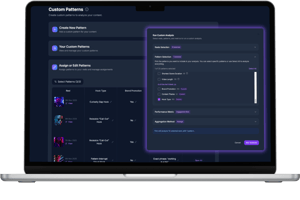
Analyze Content Your Way

Run unlimited custom analyses with 15+ metrics (views, engagement rate, replay-rate and more) to get data-driven answers about what matters to you. Choose specific time periods, select which reels to include or exclude, and test your ideas with real data. Want to track something beyond our AI detected patterns? Create your own custom patterns, tag your reels manually, and analyze what's unique to your content. Our AI learns from your tags over time and can eventually auto-assign them, making your analysis even more powerful.
V2 Teaser Feature #2 M

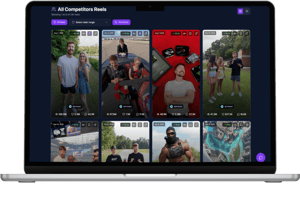
Save Hours on Content Research

Add competitors and see their best-performing reels at a glance. ViralScope monitors their accounts continuously so you spot viral trends first and get fresh inspiration for your content without spending hours on manual research. Instead of scrolling through hundreds of posts, we automatically highlight what's actually working in your niche. Stay ahead of trends and never run out of content ideas with automated competitor monitoring that works 24/7.
V2 Teaser Feature #3 M

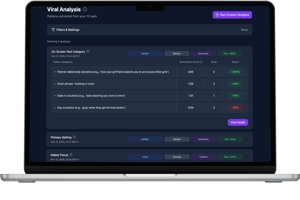
Deep Dive Into Viral Analysis

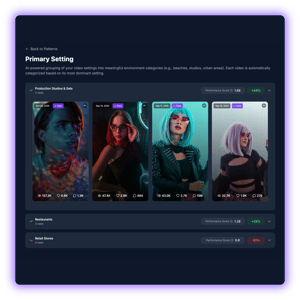
Explore each analysis and see how your reels are grouped into categories. Compare performance and discover which videos perform best in each category.
V2 Feature #1 - With Glow

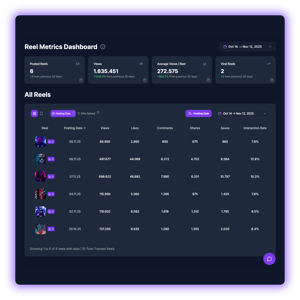
All Your Reel Stats In One Place

Track every reel's performance with precision. See which content drives your best results across multiple success metrics like views, interaction rate and more.
V2 Feature #2 - With Glow

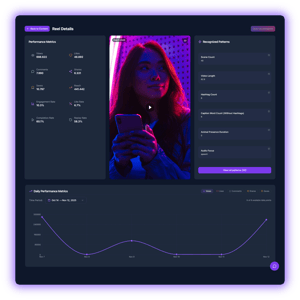
Track Every Reel's Success Path

See the complete picture for every reel with detailed metrics, growth tracking, and all detected patterns. Analyze each video's performance from every angle.
V2 Feature #3 - With Glow

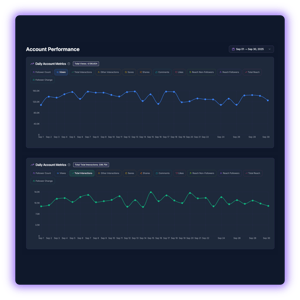
Follow Your Account's Growth

Track your account's performance over time with multiple metrics. See exactly how your followers, engagement, and views develop day by day.
V2 Feature #4 - With Glow

35+ AI Detected Patterns

ViralScope's AI analyzes your content in detail to show you how these patterns impact your performance. Discover over 35 patterns we look at.
Timing & Cadence
  • Posting hour: Which posting time performs best for your content.
  • Posting weekday: Which weekday performs best for your content.
  • Gap to previous post: What effect does the gap between your current reel to your previous reel have on its performance.
  • Gap to next post: What effect does the gap between your current reel to your next reel have on its performance.

Caption & Hashtags
  • Questions in your captions: Determines how questions in your captions affect the reel performance.
  • Caption word count: Determines which effect the length of your caption has on your reel performance.
  • Hashtag count: Determines which effect the amount of hashtags has on your reel performance.

Audio & Energy
  • Music type: Determines whether the music in your reel is high energy or calm and relaxing, and its effects on performance. 
  • Audio focus: Determines the focus of the audio of the reel, for example music or speech, and its effects on performance.

People & Presence
  • Human presence duration: Determines the percentage of the video where humans are visible and how this affects the performance of your content.
  • Average humans when visible: Determines how many humans are visible in a reel and how the amount of humans affects the performance of your content.
  • Male presence: Determines whether or not the reel includes a male person and how this affects the performance of your content.
  • Female presence: Determines whether or not the reel includes a female person and how this affects the performance of your content.


Onscreen Text & Content Setting
  • Contains subtitles: Whether or not the reel contains subtitles synchronized with the speech, and how it affects the reel performance.
  • Has onscreen text: Whether or not the reel has onscreen text and how it affects the reel performance.
  • Onscreen text category: Determines the category of your on-screen texts and how this category affects the reel performance.
  • Indoor focus: Whether or not your reel is primarily recorded indoors and how this affects its performance.
  • Primary setting: Determines the primary content / recording setting (e.g. forrest, desert, living room) and how this affects the reel performance.

Visual Style & Lighting
  • Bright scenes focus: Determines the percentage of your reel with focus on bright scenes and its effect on performance.
  • Dark scenes focus: Determines the percentage of your reel with focus on dark scenes and its effect on performance.
  • Day-night-contrast: Whether or not your reel includes a day-night-contrast and how this affects performance.
  • Dominant color: Determines the most dominant visual color of your reel and how this affects performance.
  • Visual contrast level: Determines the brightness variance and color separation and how this affects the reel performance.
  • Saturation Intensity: Determines the saturation level across your reel and how this affects the reel performance.

Scene Structure & Pacing
  • Video length: Determines the duration of your reel and how it affects its performance.
  • Multi-scene reel: Determines whether or not your reel include more than one scene.
  • Scene count: The amount of different scenes within a reel and how it affects the performance.
  • Longest scene duration: Determines the duration of your longest scene and how it affects the reel performance.
  • Shortest scene duration: Determines the duration of your shortest scene and how it affects the reel performance.
  • Average scene duration: Determines the average duration of your scenes and how it affects the reel performance.
  • Opening scene duration: Determines the duration of the opening scene for multi-scene reels and how it affects the reel performance.
  • Closing scene duration: Determines the duration of the final scene for multi-scene reels and how it affects the reel performance.
  • Scene duration variance: Determines the variance of the scene duration in your reel and how it affects the reel performance.

Animals & Pets
  • Animal presence duration: Determines the percentage of the video where animals are visible and how this affects the performance of your content.
  • Average animals when visible: Determines how many animals are visible in a reel and how the amount of animals affects the performance of your content.